
How to Track Expenses Without Spreadsheets: 5 Simple, Friction-Free Methods
Struggling with complex formulas and tiny phone cells? Learn how to track expenses without spreadsheets using simple mobile tools, cash systems, and quick-entry habits.

Spreadsheets are powerful financial tools, but for everyday money management, they often become a source of frustration. Pinching and zooming into tiny grid cells on a smartphone screen, fixing broken Excel formulas, or sitting down on Sunday evening to decipher a week's worth of crumpled receipts turns a simple habit into a stressful second job. If you have abandoned Google Sheets or Excel multiple times, you are not alone.
Learning how to track expenses without spreadsheets comes down to removing friction. When logging a purchase takes five seconds instead of five minutes, expense tracking transforms from a tedious chore into an effortless habit. This guide explores five proven, low-friction alternatives to spreadsheets—ranging from mobile-first tracker apps to tactile offline systems—so you can gain total clarity over your cash flow without touching a formula again.
Why Spreadsheets Fail Most Personal Budgets
Spreadsheets were designed for desktop computers and corporate accounting, not for recording a coffee purchase while walking out of a cafe. Understanding why they fail helps you choose a system built for real life.
Mobile friction and the desktop trap
Most spending happens on the move. When you make a purchase, opening a desktop spreadsheet app on a mobile device requires zooming in, locating the exact row, typing numbers into small cells, and selecting categories from clunky dropdowns. Because the interface is cumbersome, most people defer entry until they are back at a computer. By then, the immediate awareness of the purchase is lost.
The reconstruction trap and logging burnout
Deferring expense logging creates the "reconstruction trap"—often referred to as homework tracking. At the end of the week or month, you must cross-reference bank statements, digital receipts, and memory to recreate your spending history. Missing small cash items or vague merchant names leads to imbalances, driving frustration and causing most people to give up on tracking altogether.
5 Better Ways to Track Expenses Without Spreadsheets
Replacing spreadsheets does not mean sacrificing financial control. Here are five practical methods that prioritize speed, ease of use, and consistency.
Method 1: Mobile-First Expense Tracker Apps
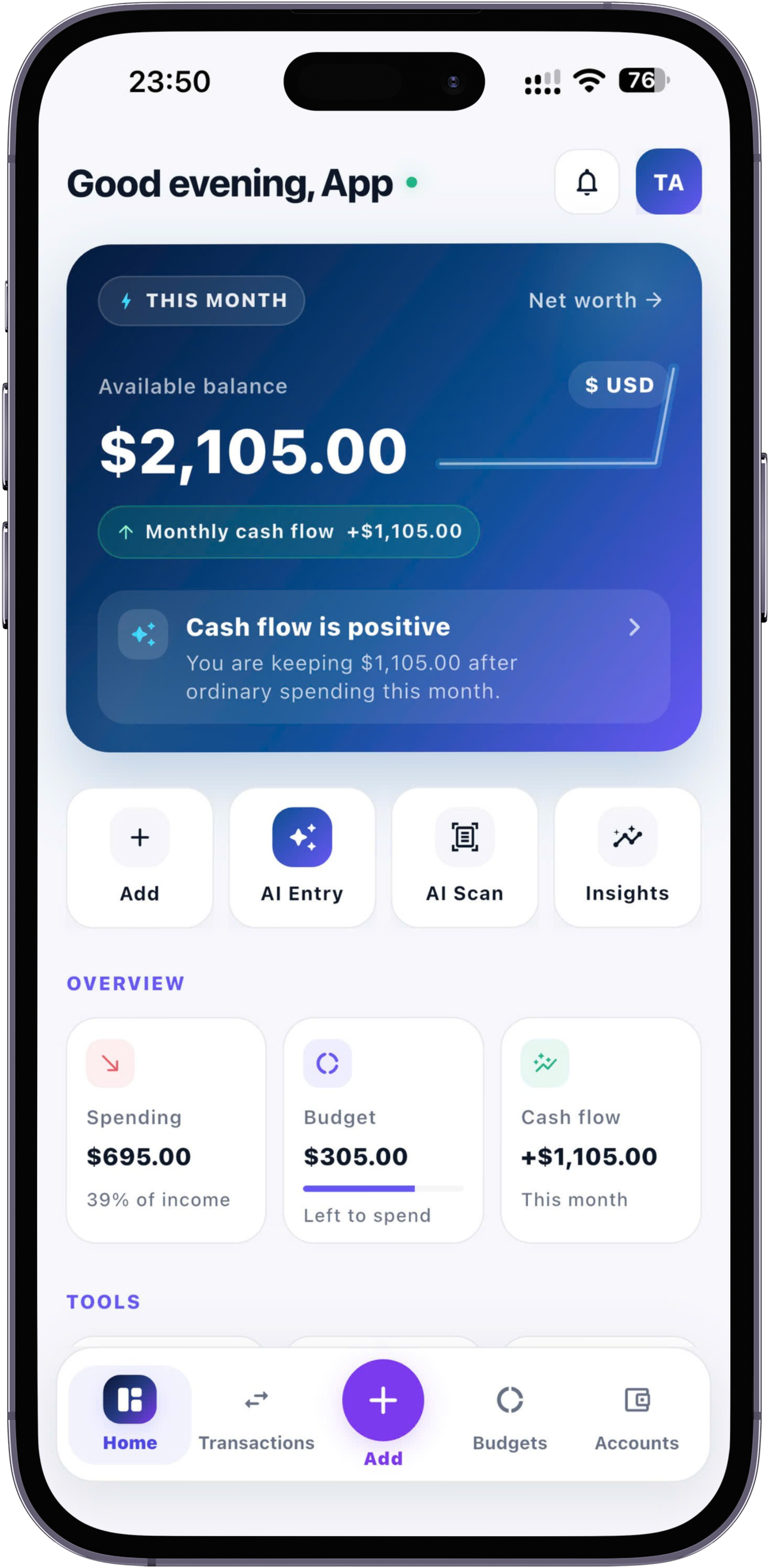
Dedicated mobile expense apps replace spreadsheet grids with streamlined, tap-friendly interfaces designed specifically for small screens. Instead of navigating rows and columns, you enter an amount, select a high-level category, and save the record in seconds.
Modern expense apps automatically organize your entries into visual charts, monthly balance summaries, and category trends without requiring custom setup. Choosing an app with an offline-first architecture ensures that your transactions save locally instantly, even when you have poor network coverage or prefer not to connect sensitive bank credentials.
Method 2: AI-Assisted Quick Entry and Receipt Scanning
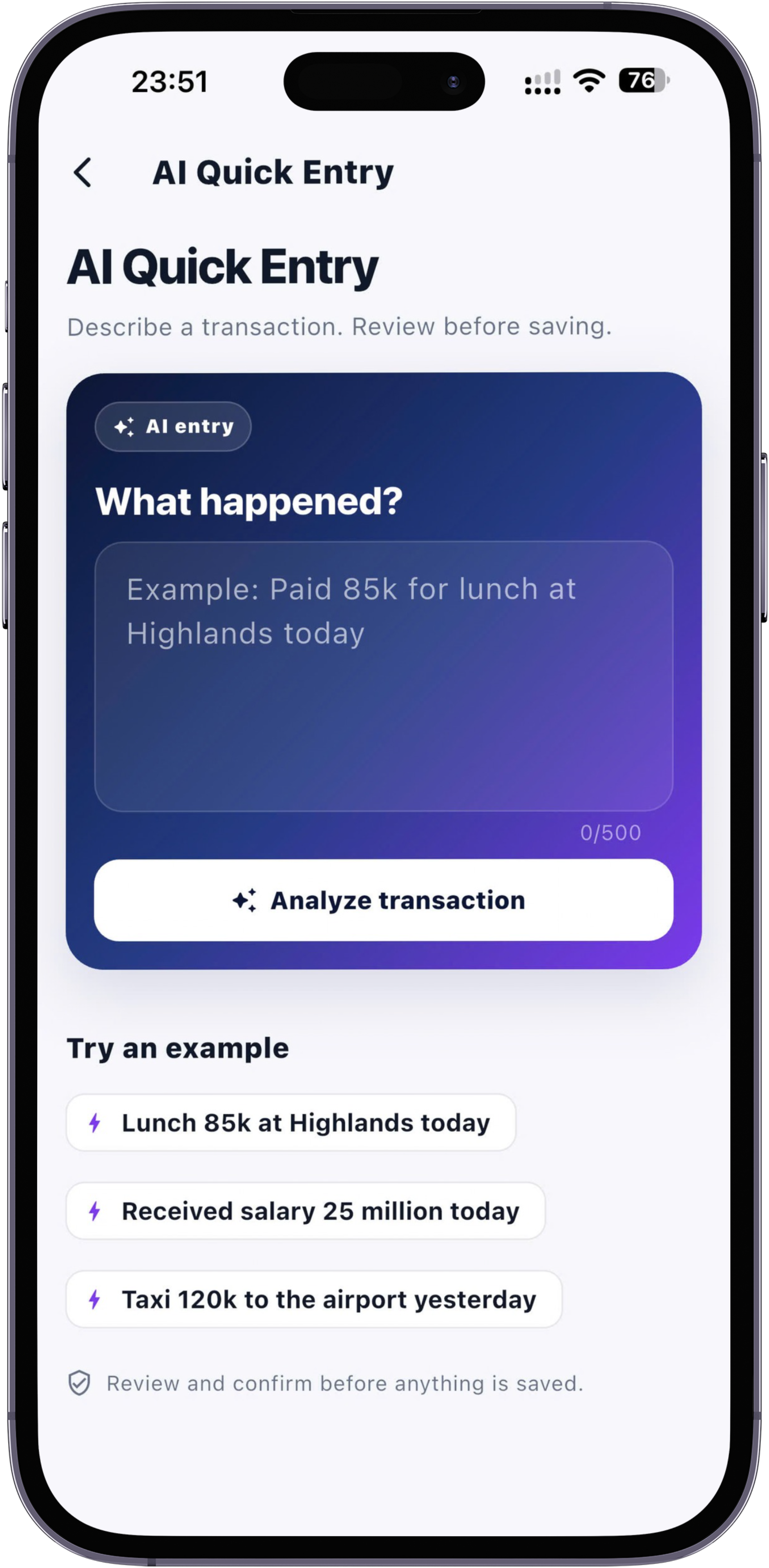
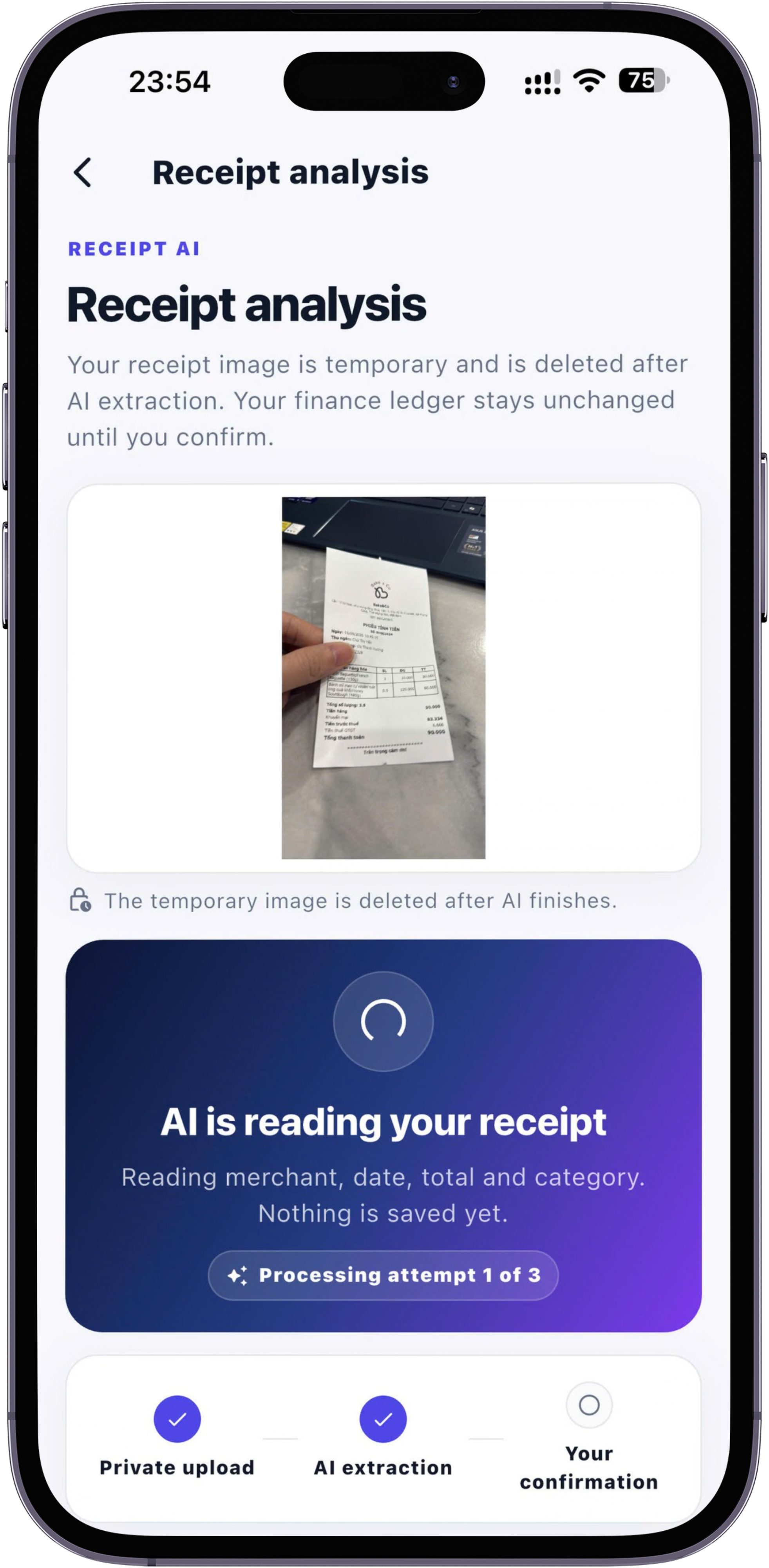
For the fastest possible entry at the point of sale, modern personal finance tools leverage artificial intelligence to convert natural inputs into structured records. Rather than filling out multiple fields manually, you can capture purchase details in seconds using text, voice, or images.
- Natural language text entry: Tools like AI Quick Entry allow you to type simple phrases such as "Coffee $4.50" or "Grocery shopping $62". The app parses the amount and category into a transaction draft for you to review and confirm with a single tap.
- Hands-free voice capture: Using your mobile device keyboard's voice-to-text functionality, you can dictate your spending aloud while walking or driving, feeding the text directly into quick-entry parsing.
- OCR receipt scanning: An AI Receipt Scanner extracts the merchant, total date, and item totals from a quick phone photo, presenting an editable draft flow for user verification before updating your account balance.
By operating as smart assistant flows where you quickly confirm the draft, these features combine the accuracy of manual review with the speed of automation.
Method 3: The Tactile Cash Envelope System
If digital tools do not appeal to you, the physical cash envelope system offers maximum spending control with zero daily math. At the beginning of a week or month, you withdraw a set amount of cash for discretionary categories (such as dining out, groceries, or entertainment) and divide the bills into physical paper envelopes.
When an envelope is empty, spending in that category stops until the next period. This tactile boundary provides immediate physical feedback without requiring any manual entry or software logging.
Method 4: Paper Journals and Bullet Notebooks
For people who prefer writing by hand, a pocket-sized notebook or financial journal provides tactile awareness without digital distraction. Keep a small notebook in your pocket or bag, and write down the date, merchant, and amount every time you make a purchase.
While paper journals do not generate automated visual reports, the physical act of writing builds deep spending mindfulness. To keep it simple, calculate category totals once a week using a basic calculator.
Method 5: Weekly Bank Statement Audits
If daily logging feels overwhelming regardless of the tool, a passive tracking approach may fit your workflow. Pay for all expenses using card or digital payments, and schedule a recurring 10-minute audit once a week to review your bank transactions.
Highlight or tag recurring bills, food, and non-essential spending on your digital statement. While this method lacks real-time intervention at the point of sale, it provides high-level cash flow visibility with zero daily operational effort.
Comparing Non-Spreadsheet Expense Tracking Methods
Use the comparison matrix below to determine which alternative aligns with your preferences for speed, convenience, and privacy:
| Tracking Method | Entry Speed at POS | Setup Effort | Offline Reliability | Best Audience |
|---|---|---|---|---|
| Mobile Tracker App | Very Fast (3–5 seconds) | Low | High (Offline-First) | Busy adults, professionals, & households |
| AI Quick Entry & Scan | Instant (Scan or voice) | Zero | High (Draft & review) | Anyone seeking zero-effort daily entry |
| Cash Envelopes | Immediate (At checkout) | Moderate | 100% Offline | Strict budgeters & cash spenders |
| Paper Notebook | Moderate (10–15 seconds) | Zero | 100% Offline | Tactile writers & minimalist spenders |
| Weekly Bank Audit | None (End of week) | Low | Requires internet | Low-volume spenders wanting high-level views |
How to Build a Frictionless Daily Expense Habit
Switching from spreadsheets to a simpler tool is only half the solution; long-term success requires building a low-stress routine.
Capture purchases at the point of sale
The secret to effortless tracking is recording transactions immediately when they occur. Whether typing a quick phrase into an app, taking a photo of a receipt, or jotting an entry in a pocket journal, logging at the counter takes seconds and eliminates memory decay.
Keep category counts low to avoid decision fatigue
One major mistake people make when abandoning spreadsheets is recreating 30 granular budget categories in their new system. Decision fatigue quickly sets in when deciding whether a coffee is "Dining," "Groceries," or "Office Expense." Stick to 5–8 broad categories such as Housing, Food & Dining, Transportation, Personal Care, and Bills.
Forgive missed entries and avoid backfilling traps
If you fall off your tracking routine for a week or two, do not spend hours hunting down old receipts to reconcile past balances. Forgive the gap, adjust your current account balances to match reality today, and start fresh from the present moment. Sustainable tracking is about current awareness, not past perfection.
Choosing the Right Method for Your Spending Style
Finding the ideal expense tracking method depends on what matters most to your routine:
- If you want maximum speed and mobile ease: Choose a dedicated mobile app like MyMoney. With its positioning—"Track your money. Effortlessly."—and core workflow ("Type it. Say it. Scan it. Done."), you can draft entries via natural language text, system keyboard voice-to-text, or OCR receipt scanning, reviewing each draft before confirmation.
- If you need strict spending guardrails: Use the tactile cash envelope system for your most vulnerable discretionary categories like dining or shopping.
- If you prioritize privacy and offline availability: Opt for offline-first mobile trackers or physical paper journals that keep your financial records stored locally on your device or notebook.
Frequently Asked Questions
Can I get accurate reporting without using complex spreadsheet formulas?
Yes. Dedicated mobile expense tracking apps automatically aggregate your transactions into clear visual reports, category pie charts, and monthly trend summaries without requiring manual formulas or pivot tables.
Is manual expense entry better than automated bank synchronization?
Manual or quick-entry tracking promotes higher financial mindfulness because you actively process each purchase. Additionally, manual and offline-first entry avoids bank credential privacy concerns, connection breakages, and automated miscategorizations.
How long should daily expense tracking take?
With streamlined mobile tools or quick-entry assistance, recording a purchase should take no more than 3 to 10 seconds at the point of sale, requiring less than two total minutes per day.
Conclusion: Ditch the Spreadsheet and Simplify Your Finances
You do not need to maintain complex spreadsheets to maintain control over your personal finances. By shifting from heavy desktop grids to mobile-first apps, quick text or voice entry, or simple cash systems, you can eliminate entry friction and establish a lasting tracking habit. Choose a simple, low-effort system today, focus on logging transactions at the point of sale, and enjoy clear, effortless visibility over your money.