
AI Receipt Scanner vs OCR: What Is the Difference for Expense Tracking?
Compare AI receipt scanners and traditional OCR for personal expense tracking. Learn how vision-language understanding, layout handling, error modes, and review flows differ.

When managing daily personal expenses, snapping a quick picture of a physical receipt seems like the ideal way to avoid tedious manual typing. However, anyone who has used mobile expense tracking apps over the past decade knows that receipt scanning hasn't always been seamless. For years, traditional Optical Character Recognition (OCR) tools often produced scrambled text, missed purchase totals, or required careful alignment to work at all.
Recent developments in artificial intelligence have introduced a new approach: multimodal AI receipt scanning. While marketers frequently group all receipt capture tools under the same label, comparing an AI receipt scanner vs OCR reveals fundamental differences in how software reads, interprets, and formats your financial data.
Understanding these differences helps working adults, freelancers, and household budgeters choose the right tools to streamline personal expense tracking without sacrificing accuracy or control.
The Core Technology Split: Character Recognition vs. Vision-Language Models
To understand why these two technologies perform differently on identical paper receipts, it helps to examine how each system processes a digital photo.
Traditional OCR: Matching Pixel Patterns to Characters
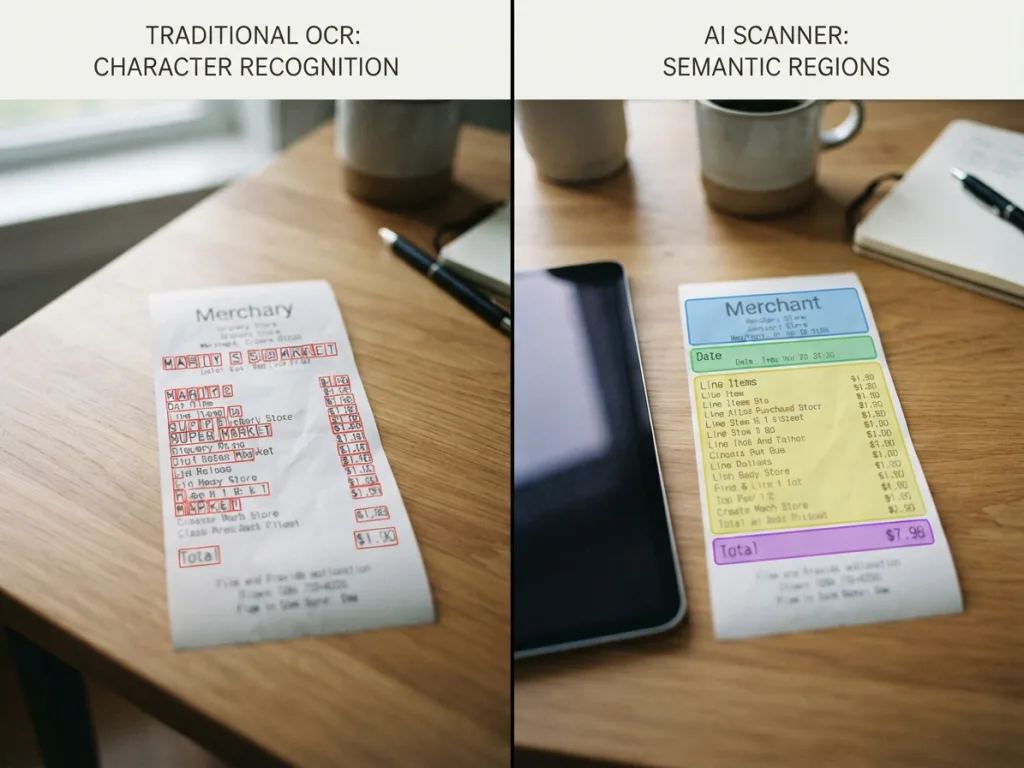
Traditional Optical Character Recognition focuses purely on visual pattern matching. When an image is fed into a standard OCR engine, the software analyzes contrast to identify dark pixels against a light background. It groups nearby pixel clusters into bounding boxes and compares those shapes against pre-defined letterforms and numerical fonts.
Once the shapes are recognized, the OCR engine outputs a raw string of plain text characters. It tells you what characters exist on the page, but it possesses no inherent understanding of what those characters mean in a financial context.
AI Receipt Scanning: Multimodal Vision and Language Understanding
An AI-powered scanner utilizes multimodal models or vision-language architectures. Instead of treating text recognition and image analysis as separate, sequential steps, multimodal AI evaluates visual structure, spatial layout, font attributes, and natural language semantics at the same time.
This allows the model to analyze a receipt holistically. Rather than simply converting pixel shapes into letters, an AI model reads the spatial relationship between lines, recognizes standard retail formatting habits, and extracts financial entities based on contextual meaning.
Extraction and Layout Flexibility: Fixed Coordinates vs. Semantic Parsing
The difference in underlying architecture leads to major operational differences when reading receipts printed on uneven, thermal, or non-standard paper.
The Fragility of Rule-Based Templates
Because classic OCR merely extracts plain text, traditional expense systems must rely on strict coordinate rules or regular expression (regex) templates to figure out which line represents the store name or the final price. For example, a legacy software setup might tell the computer: "Look at the bottom right corner of the document for a dollar sign followed by numbers."
This rule-based approach works reliably on clean, standardized digital invoices or rectangular PDF documents. However, physical thermal paper receipts rarely conform to rigid coordinates. If a receipt is creased, captured at an angle, printed with faint ink, or structured with an unusual logo placement, coordinate-based extraction frequently breaks or extracts the wrong number (such as grabbing a store phone number or barcode digits instead of the total).
Template-Free Parsing Across Unpredictable Receipts
AI receipt scanning uses zero-template semantic extraction. Because the underlying model understands language rules and document architecture, it does not rely on fixed pixel coordinates.
Whether a merchant prints the grand total at the top, middle, or bottom of the slip, an AI-driven parser evaluates the surrounding words—such as "Amount Due," "Balance Paid," or "Grand Total"—alongside visual spatial cues to pinpoint the correct figure. This flexibility makes AI scanning vastly more forgiving when scanning crumpled paper pulled from a pocket or quick photo snaps taken in low light.
Context Understanding and Categorization: From Raw Text to Transaction Drafts
For personal financial tracking, extracting text is only half the battle. The true time savings occur when raw document data is transformed into a structured transaction entry.
Identifying Merchant, Total, and Tax Fields
Traditional OCR dumps unorganized text that requires heavy programmatic post-processing. If the text string contains multiple numbers—such as subtotal, state tax, local tax, tip, and grand total—classic OCR cannot determine which number represents your actual out-of-pocket spend unless custom heuristics are hardcoded for every merchant format.
By contrast, an AI receipt scanner recognizes field definitions naturally. It separates the subtotal from sales tax, isolates tip amounts, accurately identifies the merchant name even when stylized in an unusual store logo, and maps those values directly to designated database fields.
Automating Category Suggestions Without Complex Setup
Beyond mapping amounts, AI models can infer spending intent from line items and merchant context. If a scan contains items like "whole milk," "bread," and "paper towels," an AI parser can automatically suggest assigning the entry to a "Groceries" or "Household Supplies" budget category.
Traditional OCR cannot perform this step natively; it requires users to manually select spending categories or write custom keyword rules for every place they shop.
The Review Workflow: Why Human-in-the-Loop Verification Is Still Required
Despite significant advancements in artificial intelligence, no automated system offers absolute perfection across every real-world document. A key principle of practical personal finance software is recognizing the distinction between automated assistance and final recordkeeping.
Data Extraction as an Assistant, Not Autonomous Financial Advice
AI document processing should be viewed as an efficient administrative assistant rather than an autonomous controller. Software that automatically saves financial entries to your budget without approval risks introducing subtle errors into your financial history. Furthermore, automated data processing tools do not constitute financial advice or official auditing.
How Editable Draft Flows Save Time
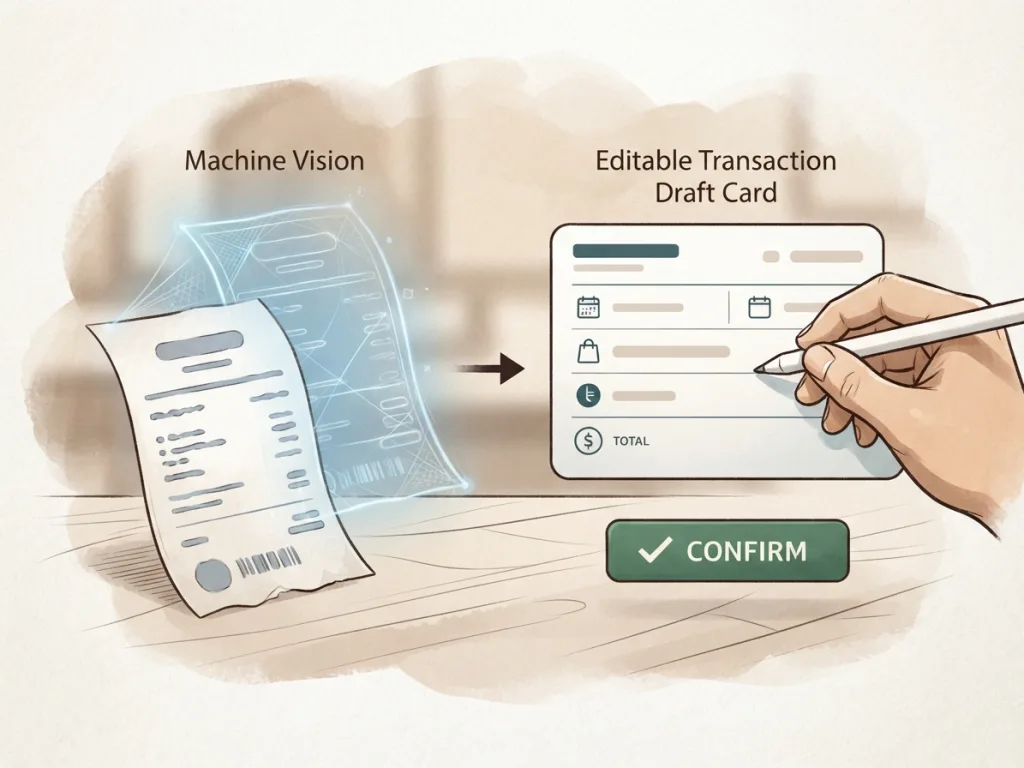
The most reliable financial software implements a "Human-in-the-Loop" (HITL) design workflow. When you scan a physical receipt using tools like the MyMoney AI receipt scanner, the software extracts the document details into a pre-populated draft transaction.
Instead of typing the merchant name, date, and transaction amount from scratch, you simply review the populated fields on screen, make any necessary adjustments with a quick tap, and confirm the log. This review step maintains complete accuracy while drastically reducing entry friction.
This fits seamlessly alongside flexible input options. For instance, when paper receipts aren't available, users might prefer using natural language text via AI quick entry or speaking an expense using device voice-to-text input. Having multiple review-based entry paths—captured by the phrase "Type it. Say it. Scan it. Done."—ensures expense tracking remains simple regardless of context.
Error Modes and Edge Cases: Character Swaps vs. Over-Inference Risks
Both traditional OCR and AI scanners encounter errors, but their underlying architectures lead to entirely different failure modes.
Typographical Misreads in Optical OCR
Because classic OCR relies on pixel geometry, its primary error mode involves character misidentification:
- Reading the letter "S" as the digit "5"
- Confusing the capital letter "O" with the number "0"
- Mistaking an italicized "1" or vertical bar "|" for the lowercase letter "l"
When an OCR misread occurs, the resulting financial record contains obvious mechanical typos (e.g., recording a purchase price as "$1O.5O"), forcing the user to manually edit character strings.
Contextual Guessing and Hallucination in AI
AI models rarely make isolated character substitution mistakes. Instead, their primary risk involves over-inference or contextual guessing (often referred to as model hallucination). If part of a price is completely obscured by an ink smudge, a language model might attempt to fill in a plausible number based on surrounding line items rather than leaving the field blank.
Because an AI error yields realistic-looking values rather than obvious character typos, prompt constraints and careful review interface designs are critical to prevent unverified guesses from slipping into personal accounting records.
Severely Faded or Ripped Receipts
If a thermal paper receipt has faded entirely or has crucial numbers ripped off, neither technology can magically restore missing physical data. High-quality systems handle these edge cases gracefully by recognizing low confidence scores and leaving ambiguous fields blank, allowing the user to type in the missing figure manually during the review step.
Privacy, Data Handling, and Local Storage Considerations
Receipts carry personal information, including retail store locations, timestamps, partial credit card numbers (last 4 digits), and detailed purchase habits. Evaluating any scanning technology requires considering data privacy and document handling.
Cloud Transmission vs. On-Device Control
Traditional OCR engines are often lightweight enough to run entirely locally on mobile phone hardware. However, basic local OCR frequently sacrifices context awareness and category intelligence.
AI receipt scanning often involves sending encrypted image payloads to secure cloud inference engines trained to execute complex vision-language models. Users seeking personal data security should ensure their expense tracking platform prioritizes strict privacy standards, clear data deletion policies, and strong local storage options.
Protecting Sensitive Payment Information
Modern expense apps designed with local data control allow users to store their finalized transaction history on-device using offline-first storage practices. Even when cloud services are utilized temporarily to parse an image into a draft, keeping your ongoing ledger stored locally protects your financial history from unnecessary third-party exposure.
Traditional OCR vs. AI Receipt Scanner: Side-by-Side Comparison
The table below summarizes the practical operational differences between classic coordinate-based OCR and modern AI receipt scanning for daily expense tracking.
| Feature / Dimension | Traditional OCR | AI Receipt Scanner | Practical Impact for Expense Tracking |
|---|---|---|---|
| Core Mechanics | Matches pixel clusters to predefined character shapes. | Analyzes visual layout and language context simultaneously. | OCR outputs unorganized text strings; AI delivers a structured draft transaction. |
| Layout Adaptation | Requires fixed templates, exact coordinates, or custom regex rules. | Template-free; adapts natively to varying merchant formats. | Works across new stores without custom software configuration. |
| Context Awareness | Cannot distinguish total prices from phone numbers or tax rates natively. | Identifies grand totals, sub-totals, sales tax, and merchant names accurately. | Eliminates manual copy-pasting of individual numbers into designated app fields. |
| Tolerance for Defects | Fails easily on creased, angled, or low-contrast thermal paper. | Uses semantic surrounding context to interpret degraded or angled prints. | Higher scan success rates with handheld smartphone photos. |
| Primary Failure Mode | Character swaps (e.g., misreading "S" as "5" or "0" as "O"). | Plausible over-inference or guessing if text is physically missing. | OCR requires cleaning up text typos; AI requires confirming correct numbers against source paper. |
| User Workflow | Heavy manual cleanup needed to format text into database entries. | Review flow where user confirms pre-filled draft fields before saving. | Faster logging flow centered on verification rather than data entry. |
Choosing the Right Input Workflow for Your Financial Routine
Neither traditional OCR nor AI receipt scanning changes the fundamental rule of personal finance: consistent tracking leads to better budget control. The value of modern technology lies in reducing friction so that logging expenses becomes second nature.
If you primarily handle digital PDF invoices with static layouts, traditional rule-based tools remain lightweight and predictable. However, if your daily life involves pocketing physical store receipts, dining out, purchasing household groceries, or managing expense records on the go, an AI-powered receipt scanner offers superior adaptability and contextual automation.
By pairing AI document parsing with an editable human review flow, you enjoy the speed of automated entry while retaining complete authority over your personal budget records.
Ready to simplify your daily recordkeeping? Explore how you can download MyMoney to establish an offline-first expense tracking routine, or visit our MyMoney support guide to learn more about optimizing your logging workflows.